mirror of
https://github.com/shmilylty/OneForAll.git
synced 2026-08-26 04:47:48 +08:00
 Jing Ling
318 lines
19 KiB
Markdown
318 lines
19 KiB
Markdown
# OneForAll
|
||
|
||
[](https://travis-ci.org/shmilylty/OneForAll)
|
||
[](https://codecov.io/gh/shmilylty/OneForAll)
|
||
[](https://codeclimate.com/github/shmilylty/OneForAll/maintainability)
|
||
[](https://github.com/shmilylty/OneForAll/tree/master/LICENSE)
|
||
[](https://github.com/shmilylty/OneForAll/tree/master/)
|
||
[](https://github.com/shmilylty/OneForAll/releases)
|
||
|
||
👊**OneForAll是一款功能强大的子域收集工具** 📝[English Document](https://github.com/shmilylty/OneForAll/tree/master/README.en.md)
|
||
|
||

|
||
|
||
## 🎉项目简介
|
||
|
||
项目主页:[https://shmilylty.github.io/OneForAll/](https://shmilylty.github.io/OneForAll/)
|
||
|
||
项目地址:[https://github.com/shmilylty/OneForAll](https://github.com/shmilylty/OneForAll)
|
||
|
||
在渗透测试中信息收集的重要性不言而喻,子域收集是信息收集中必不可少且非常重要的一环,目前网上也开源了许多子域收集的工具,但是总是存在以下部分问题:
|
||
|
||
* **不够强大**,子域收集的接口不够多,不能做到对批量子域自动收集,没有自动子域解析,验证,FUZZ以及信息拓展等功能。
|
||
* **不够友好**,固然命令行模块比较方便,但是当可选的参数很多,要实现的操作复杂,用命令行模式就有点不够友好,如果有交互良好,高可操作的前端那么使用体验就会好很多。
|
||
|
||
* **缺少维护**,很多工具几年没有更新过一次,issues和PR是啥,不存在的。
|
||
|
||
* **效率问题**,没有利用多进程,多线程以及异步协程技术,速度较慢。
|
||
|
||
为了解决以上痛点,此项目应用而生,正如其名,我希望OneForAll是一款集百家之长,功能强大的全面快速子域收集终极神器🔨。
|
||
|
||
目前OneForAll还在开发中,肯定有不少问题和需要改进的地方,欢迎大佬们提交[Issues](https://github.com/shmilylty/OneForAll/issues)和[PR](https://github.com/shmilylty/OneForAll/pulls),用着还行给个小星星✨吧,目前有一个专门用于OneForAll交流和反馈QQ群👨👨👦👦::[**824414244**](//shang.qq.com/wpa/qunwpa?idkey=125d3689b60445cdbb11e4ddff38036b7f6f2abbf4f7957df5dddba81aa90771)(加群验证:我的英雄学院)。
|
||
|
||
## 👍功能特性
|
||
|
||
* **收集能力强大**,详细模块请阅读[收集模块说明](https://github.com/shmilylty/OneForAll/tree/master/docs/collection_modules.md)。
|
||
1. 利用证书透明度收集子域(目前有6个模块:`censys_api`,`certspotter`,`crtsh`,`entrust`,`google`,`spyse_api`)
|
||
|
||
2. 常规检查收集子域(目前有4个模块:域传送漏洞利用`axfr`,检查跨域策略文件`cdx`,检查HTTPS证书`cert`,检查内容安全策略`csp`,检查robots文件`robots`,检查sitemap文件`sitemap`,后续会添加检查NSEC记录,NSEC3记录等模块)
|
||
|
||
3. 利用网上爬虫档案收集子域(目前有2个模块:`archivecrawl`,`commoncrawl`,此模块还在调试,该模块还有待添加和完善)
|
||
|
||
4. 利用DNS数据集收集子域(目前有23个模块:`binaryedge_api`, `bufferover`, `cebaidu`, `chinaz`, `chinaz_api`, `circl_api`, `dnsdb_api`, `dnsdumpster`, `hackertarget`, `ip138`, `ipv4info_api`, `netcraft`, `passivedns_api`, `ptrarchive`, `qianxun`, `rapiddns`, `riddler`, `robtex`, `securitytrails_api`, `sitedossier`, `threatcrowd`, `wzpc`, `ximcx`)
|
||
|
||
5. 利用DNS查询收集子域(目前有5个模块:通过枚举常见的SRV记录并做查询来收集子域`srv`,以及通过查询域名的DNS记录中的MX,NS,SOA,TXT记录来收集子域)
|
||
|
||
6. 利用威胁情报平台数据收集子域(目前有6个模块:`alienvault`, `riskiq_api`,`threatbook_api`,`threatminer`,`virustotal`,`virustotal_api`该模块还有待添加和完善)
|
||
|
||
7. 利用搜索引擎发现子域(目前有18个模块:`ask`, `baidu`, `bing`, `bing_api`, `duckduckgo`, `exalead`, `fofa_api`, `gitee`, `github`, `github_api`, `google`, `google_api`, `shodan_api`, `so`, `sogou`, `yahoo`, `yandex`, `zoomeye_api`),在搜索模块中除特殊搜索引擎,通用的搜索引擎都支持自动排除搜索,全量搜索,递归搜索。
|
||
* **支持子域爆破**,该模块有常规的字典爆破,也有自定义的fuzz模式,支持批量爆破和递归爆破,自动判断泛解析并处理。
|
||
* **支持子域验证**,默认开启子域验证,自动解析子域DNS,自动请求子域获取title和banner,并综合判断子域存活情况。
|
||
* **支持子域接管**,默认开启子域接管风险检查,支持子域自动接管(目前只有Github,有待完善),支持批量检查。
|
||
* **处理功能强大**,发现的子域结果支持自动去除,自动DNS解析,HTTP请求探测,自动筛选出有效子域,拓展子域的Banner信息,最终支持的导出格式有`rst`, `csv`, `tsv`, `json`, `yaml`, `html`, `xls`, `xlsx`, `dbf`, `latex`, `ods`。
|
||
* **速度极快**,[收集模块](https://github.com/shmilylty/OneForAll/tree/master/collect.py)使用多线程调用,[爆破模块](https://github.com/shmilylty/OneForAll/tree/master/brute.py)使用[massdns](https://github.com/blechschmidt/massdns),默认配置下速度最少能达到10000pps,子域验证中DNS解析和HTTP请求使用异步多协程,多线程检查[子域接管](https://github.com/shmilylty/OneForAll/tree/master/takeover.py)风险。
|
||
* **体验良好**,日志和终端输出全使用中文,各模块都有进度条,异步保存各模块结果。
|
||
|
||
如果你有其他很棒的想法请务必告诉我!😎
|
||
|
||
## 🚀上手指南
|
||
|
||
📢 请务必花一点时间阅读此文档,有助于你快速熟悉OneForAll!
|
||
|
||
**🐍安装要求**
|
||
|
||
OneForAll基于[Python 3.8.0]( https://www.python.org/downloads/release/python-380/ )开发和测试,请使用高于Python 3.8.0的稳定发行版本,其他版本可能会出现一些问题(Windows平台必须使用3.8.0以上版本),安装Python环境可以参考[Python 3 安装指南](https://pythonguidecn.readthedocs.io/zh/latest/starting/installation.html#python-3)。运行以下命令检查Python和pip3版本:
|
||
```bash
|
||
python -V
|
||
pip3 -V
|
||
```
|
||
如果你看到以下类似输出便说明Python环境没有问题:
|
||
```bash
|
||
Python 3.8.0
|
||
pip 19.2.2 from C:\Users\shmilylty\AppData\Roaming\Python\Python38\site-packages\pip (python 3.8)
|
||
```
|
||
|
||
**✔安装步骤(git 版)**
|
||
|
||
1. **下载**
|
||
|
||
由于该项目**处于开发中**,会不断进行更新迭代,下载时使用`git clone`**克隆**最新代码仓库,也方便后续的更新,不推荐从Releases下载,因为Releases里版本更新缓慢,也不方便更新,
|
||
本项目已经在[码云](https://gitee.com/shmilylty/OneForAll.git)(Gitee)镜像了一份,国内推荐使用码云进行克隆比较快:
|
||
|
||
```bash
|
||
git clone https://gitee.com/shmilylty/OneForAll.git
|
||
```
|
||
或者:
|
||
```bash
|
||
git clone https://github.com/shmilylty/OneForAll.git
|
||
```
|
||
|
||
2. **安装**
|
||
|
||
你可以通过pip3安装OneForAll的依赖(如果你熟悉[pipenv](https://docs.pipenv.org/en/latest/),那么推荐你使用[pipenv安装依赖]((https://github.com/shmilylty/OneForAll/tree/master/docs/Installation_dependency.md))),以下为**Windows系统**下使用**pip3**安装依赖的示例:(注意:如果你的Python3安装在系统Program Files目录下,如:`C:\Program Files\Python38`,那么请以管理员身份运行命令提示符cmd执行以下命令!)
|
||
```bash
|
||
cd OneForAll/
|
||
python -m pip install -U pip setuptools wheel -i https://mirrors.aliyun.com/pypi/simple/
|
||
pip3 install -r requirements.txt -i https://mirrors.aliyun.com/pypi/simple/
|
||
python oneforall.py --help
|
||
```
|
||
其他系统平台的请参考[依赖安装](https://github.com/shmilylty/OneForAll/tree/master/docs/installation_dependency.md),如果在安装依赖过程中发现编译某个依赖库失败时可以参考[troubleshooting.md](https://github.com/shmilylty/OneForAll/tree/master/docs/troubleshooting.md)中解决方法,如果还没有解决欢迎加群反馈。
|
||
|
||
3. **更新**
|
||
|
||
❗注意:如果你之前已经克隆了项目运行之前请**备份**自己修改过的文件到项目外的地方(如**config.py**),然后执行以下命令**更新**项目:
|
||
|
||
```bash
|
||
git fetch --all
|
||
git reset --hard origin/master
|
||
git pull
|
||
```
|
||
|
||
**✔安装步骤(docker 版)**
|
||
|
||
方法一:直接拉取部署好的镜像(更新不及时)
|
||
|
||
```shell
|
||
docker pull tardis07/oneforall
|
||
docker run -it oneforall
|
||
```
|
||
|
||
方法二:从 `Dockerfile` 中构建(同git版)
|
||
|
||
```shell
|
||
docker build -t oneforall .
|
||
docker run -it --rm -v ~/results:/OneForAll/results oneforall
|
||
```
|
||
结果会输出在本地目录`~/results`
|
||
|
||
**✨使用演示**
|
||
|
||
1. 如果你是通过pip3安装的依赖则使用以下命令运行示例:
|
||
```bash
|
||
python3 oneforall.py --target example.com run
|
||
```
|
||
|
||

|
||
|
||
2. 如果你通过pipenv安装的依赖则使用以下命令运行示例:
|
||
```bash
|
||
pipenv run python oneforall.py --target example.com run
|
||
```
|
||
|
||
**🧐结果说明**
|
||
|
||
我们以`python3 oneforall.py --target example.com run`命令为例,OneForAll在默认参数正常执行完毕会在results目录生成相应结果:
|
||
|
||

|
||
|
||
`example.com.csv`是每个主域下的子域收集结果。
|
||
|
||
`all_subdomain_result_1583034493.csv`是每次运行OneForAll收集到子域的汇总结果,包含`example.com.csv`,方便在批量收集场景中获取全部结果。
|
||
|
||
`result.sqlite3`是存放每次运行OneForAll收集到子域的SQLite3结果数据库,其数据库结构如下图:
|
||
|
||

|
||
|
||
其中类似`example_com_origin_result`表存放每个模块最初子域收集结果。
|
||
|
||
其中类似`example_com_resolve_result`表存放对子域进行解析后的结果。
|
||
|
||
其中类似`example_com_last_result`表存放上一次子域收集结果(需要收集两次以上才会生成)。
|
||
|
||
其中类似`example_com_now_result`表存放现在子域收集结果,一般情况关注这张表就可以了。
|
||
|
||
**🤔使用帮助**
|
||
|
||
命令行参数只提供了一些常用参数,更多详细的参数配置请见[config.py](https://github.com/shmilylty/OneForAll/tree/master/config/setting.py),如果你认为有些参数是命令界面经常使用到的或缺少了什么参数等问题非常欢迎反馈。由于众所周知的原因,如果要使用一些被墙的收集接口请先到[config.py](https://github.com/shmilylty/OneForAll/tree/master/config/setting.py)配置代理,有些收集模块需要提供API(大多都是可以注册账号免费获取),如果需要使用请到[api.py](https://github.com/shmilylty/OneForAll/tree/master/config/api.py)配置API信息,如果不使用请忽略有关报错提示。(详细模块请阅读[收集模块说明](https://github.com/shmilylty/OneForAll/tree/master/docs/collection_modules.md))
|
||
|
||
OneForAll命令行界面基于[Fire](https://github.com/google/python-fire/)实现,有关Fire更高级使用方法请参阅[使用Fire CLI](https://github.com/google/python-fire/blob/master/docs/using-cli.md)。
|
||
|
||
[oneforall.py](https://github.com/shmilylty/OneForAll/tree/master/oneforall.py)是主程序入口,oneforall.py可以调用[brute.py](https://github.com/shmilylty/OneForAll/tree/master/brute.py),[takerover.py](https://github.com/shmilylty/OneForAll/tree/master/takerover.py)及[dbexport.py](https://github.com/shmilylty/OneForAll/tree/master/dbexport.py)等模块,为了方便进行子域爆破独立出了brute.py,为了方便进行子域接管风险检查独立出了takerover.py,为了方便数据库导出独立出了dbexport.py,这些模块都可以单独运行,并且所接受参数要更丰富一点,如果要单独使用这些模块请参考[使用帮助](https://github.com/shmilylty/OneForAll/tree/master/docs/usage_help.md)
|
||
|
||
❗注意:当你在使用过程中遇到一些问题或者疑惑时,请先到[Issues](https://github.com/shmilylty/OneForAll/issues)里使用搜索找找答案,还可以参阅[常见问题与回答](https://github.com/shmilylty/OneForAll/tree/master/docs/Q&A.md)。
|
||
|
||
**oneforall.py使用帮助**
|
||
|
||
以下帮助信息可能不是最新的,你可以使用`python oneforall.py --help`获取最新的帮助信息。
|
||
|
||
```bash
|
||
python oneforall.py --help
|
||
```
|
||
```bash
|
||
NAME
|
||
oneforall.py - OneForAll帮助信息
|
||
|
||
SYNOPSIS
|
||
oneforall.py COMMAND | --target=TARGET <flags>
|
||
|
||
DESCRIPTION
|
||
OneForAll是一款功能强大的子域收集工具
|
||
|
||
Example:
|
||
python3 oneforall.py version
|
||
python3 oneforall.py --target example.com run
|
||
python3 oneforall.py --target ./domains.txt run
|
||
python3 oneforall.py --target example.com --valid None run
|
||
python3 oneforall.py --target example.com --brute True run
|
||
python3 oneforall.py --target example.com --port small run
|
||
python3 oneforall.py --target example.com --format csv run
|
||
python3 oneforall.py --target example.com --dns False run
|
||
python3 oneforall.py --target example.com --req False run
|
||
python3 oneforall.py --target example.com --takeover False run
|
||
python3 oneforall.py --target example.com --show True run
|
||
|
||
Note:
|
||
参数valid可选值1,0,None分别表示导出有效,无效,全部子域
|
||
参数port可选值有'default', 'small', 'large', 详见config.py配置
|
||
参数format可选格式有'rst', 'csv', 'tsv', 'json', 'yaml', 'html',
|
||
'jira', 'xls', 'xlsx', 'dbf', 'latex', 'ods'
|
||
参数path默认None使用OneForAll结果目录生成路径
|
||
|
||
ARGUMENTS
|
||
TARGET
|
||
单个域名或者每行一个域名的文件路径(必需参数)
|
||
|
||
FLAGS
|
||
--brute=BRUTE
|
||
使用爆破模块(默认False)
|
||
--dns=DNS
|
||
DNS解析子域(默认True)
|
||
--req=REQ
|
||
HTTP请求子域(默认True)
|
||
--port=PORT
|
||
请求验证子域的端口范围(默认只探测80端口)
|
||
--valid=VALID
|
||
导出子域的有效性(默认None)
|
||
--format=FORMAT
|
||
导出文件格式(默认csv)
|
||
--path=PATH
|
||
导出文件路径(默认None)
|
||
--takeover=TAKEOVER
|
||
检查子域接管(默认False)
|
||
--show=SHOW
|
||
终端显示导出数据(默认False)
|
||
```
|
||
|
||
## 🌲目录结构
|
||
项目的目录结构说明请参阅[directory_structure](https://github.com/shmilylty/OneForAll/tree/master/docs/directory_structure.md)。
|
||
|
||
关于子域字典来源的说明:
|
||
1. 开源子域收集工具中的部分高频子域名字字典。
|
||
2. 网上有关服务商公布的最流行子域列表。
|
||
* [DNSPod](https://github.com/DNSPod/oh-my-free-data)
|
||
3. 网上有关安全研究人员关于对全网常见子域的研究结果。
|
||
* [the_most_popular_subdomains_on_the_internet](https://bitquark.co.uk/blog/2016/02/29/the_most_popular_subdomains_on_the_internet)
|
||
* [The most popular subdomains on the internet (2017 edition)](https://medium.com/@cmeister2/the-most-popular-subdomains-on-the-internet-2017-edition-a6b9c8a20fd8)
|
||
4. 常见业务命名规律:
|
||
* 单字母、单字母+单数字、双字母、双字母+单数字、双字母+双数字、三字母、四字母;
|
||
* 单数字、双数字、三数字;
|
||
5. 在公司或者说在DevOps中常见的工具和软件名称。
|
||
6. 常见中文单词拼音和常见英文单词。
|
||
7. 从以上获取的字典做优化排序以及脏数据去除处理。
|
||
8. 非常欢迎你贡献更好的字典。
|
||
|
||
## 👏用到框架
|
||
|
||
* [aiodns](https://github.com/saghul/aiodns) - 简单DNS异步解析库。
|
||
* [aiohttp](https://github.com/aio-libs/aiohttp) - 异步http客户端/服务器框架
|
||
* [aiomultiprocess](https://github.com/jreese/aiomultiprocess) - 将Python代码提升到更高的性能水平(multiprocessing和asyncio结合,实现异步多进程多协程)
|
||
* [beautifulsoup4](https://pypi.org/project/beautifulsoup4/) - 可以轻松从HTML或XML文件中提取数据的Python库
|
||
* [fire](https://github.com/google/python-fire) - Python Fire是一个纯粹根据任何Python对象自动生成命令行界面(CLI)的库
|
||
* [loguru](https://github.com/Delgan/loguru) - 旨在带来愉快的日志记录Python库
|
||
* [massdns](https://github.com/blechschmidt/massdns) - 高性能的DNS解析器
|
||
* [records](https://github.com/kennethreitz/records) - Records是一个非常简单但功能强大的库,用于对大多数关系数据库进行最原始SQL查询。
|
||
* [requests](https://github.com/psf/requests) - Requests 唯一的一个非转基因的 Python HTTP 库,人类可以安全享用。
|
||
* [tqdm](https://github.com/tqdm/tqdm) - 适用于Python和CLI的快速,可扩展的进度条库
|
||
|
||
感谢这些伟大优秀的Python库!
|
||
|
||
## 🙏贡献
|
||
|
||
非常热烈欢迎各位大佬一起完善本项目!
|
||
|
||
## ⌛后续计划
|
||
|
||
- [ ] 各模块持续优化和完善
|
||
- [x] 子域监控(标记每次新发现的子域)
|
||
- [ ] 子域收集爬虫实现(包括从JS等静态资源文件中收集子域)
|
||
- [ ] 操作强大交互人性的前端界面实现(暂定:前端:Element + 后端:Flask)
|
||
|
||
更多详细信息请阅读[todo.md](https://github.com/shmilylty/OneForAll/tree/master/docs/todo.md)。
|
||
|
||
## 🔖版本控制
|
||
|
||
该项目使用[SemVer](https://semver.org/)语言化版本格式进行版本管理,你可以在[Releases](https://github.com/shmilylty/OneForAll/releases)查看可用版本,你可以查阅[changes.md](https://github.com/shmilylty/OneForAll/tree/master/docs/changes.md)了解历史变更情况。
|
||
|
||
## 👨💻贡献者
|
||
|
||
* **[Jing Ling](https://github.com/shmilylty)**
|
||
* 核心开发
|
||
|
||
你可以在[contributors.md](https://github.com/shmilylty/OneForAll/tree/master/docs/contributors.md)中查看所有参与该项目的开发者。
|
||
|
||
## ☕赞赏
|
||
|
||
如果你觉得这个项目帮助到了你,你可以打赏一杯咖啡以资鼓励:)
|
||
|
||

|
||
|
||
## 📄版权
|
||
|
||
该项目签署了GPL-3.0授权许可,详情请参阅[LICENSE](https://github.com/shmilylty/OneForAll/LICENSE)。
|
||
|
||
## 😘鸣谢
|
||
|
||
感谢网上开源的各个子域收集项目!
|
||
|
||
感谢[A-Team](https://github.com/QAX-A-Team)大哥们热情无私的问题解答!
|
||
|
||
## 📜免责声明
|
||
|
||
本工具仅限于合法授权的企业安全建设,在使用本工具过程中,您应确保自己所有行为符合当地的法律法规,并且已经取得了足够的授权。
|
||
如您在使用本工具的过程中存在任何非法行为,您需自行承担所有后果,本工具所有作者和所有贡献者不承担任何法律及连带责任。
|
||
除非您已充分阅读、完全理解并接受本协议所有条款,否则,请您不要安装并使用本工具。
|
||
您的使用行为或者您以其他任何明示或者默示方式表示接受本协议的,即视为您已阅读并同意本协议的约束。
|
||
|
||
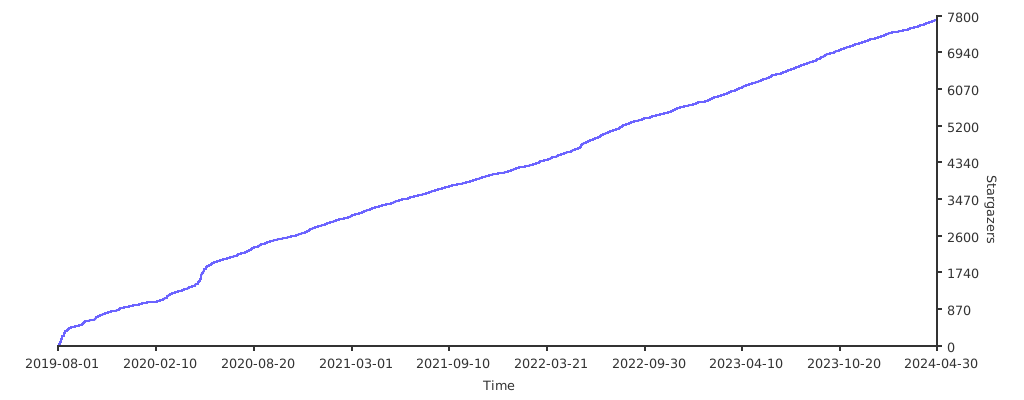
## 💖Star趋势
|
||
|
||
[](https://starchart.cc/shmilylty/OneForAll) |